Billing & payments for children's activity centres, finally without the chasing.
Happy Kamper bills children's activity centres with recurring invoices for monthly tuition, upfront payments for term programs, and ticket bundles for drop-in classes. Invoices go out over WhatsApp and email, and parents pay by bank transfer, QR, e-wallet, or card. One dashboard tracks who has paid, who has not, and the totals.
Recurring invoices for monthly tuition. Upfront payments for term programs. Ticket bundles for drop-in classes. One organised reconciliation dashboard for who has paid, who has not, and how to follow up. Built for preschools, daycares, tutoring centers, and activity centres. Invoices over WhatsApp and email, money in via bank transfer, QR, e-wallet and cards.
Recurring, upfront, or ticket bundles.
Paid in the app or online.
Plus a manual nudge from the dashboard.
Track payments, outstanding and overdue balances, and follow up with a click.
What billing models are supported? Use whichever fits the program.
Different programs collect money differently. Happy Kamper supports the three real models centres actually use. Pick the one that fits each activity, mix them across your centre.
When do you use recurring invoices?
Best for monthly tuition, ongoing daycare fees, anything billed on a regular cadence.
- Bill weekly, bi-weekly, or monthly
- Recurring and one-off charges can sit on the same invoice
- Automated reminders on due dates
When do you use upfront payments?
Best for single sessions, multi-day workshops, full-term programs, pay once, in advance.
- Holiday camp · 3 days
- 12-week swim term
- One-off trial class
- Set a start date and an end date
- Same payment methods as everything else
When do you use ticket bundles (class packs)?
Best for drop-in classes, swim packs, music sessions, parents buy a bundle and schedule when they want.
- Buy once, schedule on demand
- Valid until used, not date-bound
- Not a wallet, these are class passes, not stored cash
Can you add a one-off charge whenever you need to?
A late fee, a materials charge, a uniform top-up, a damages charge. Any of these can be added manually to a parent invoice. One-off charges and recurring charges can coexist on the same invoice.
Providers can set provider-wide or activity-wide, time-bound discounts, applied manually. No automatic sibling or family discounts.
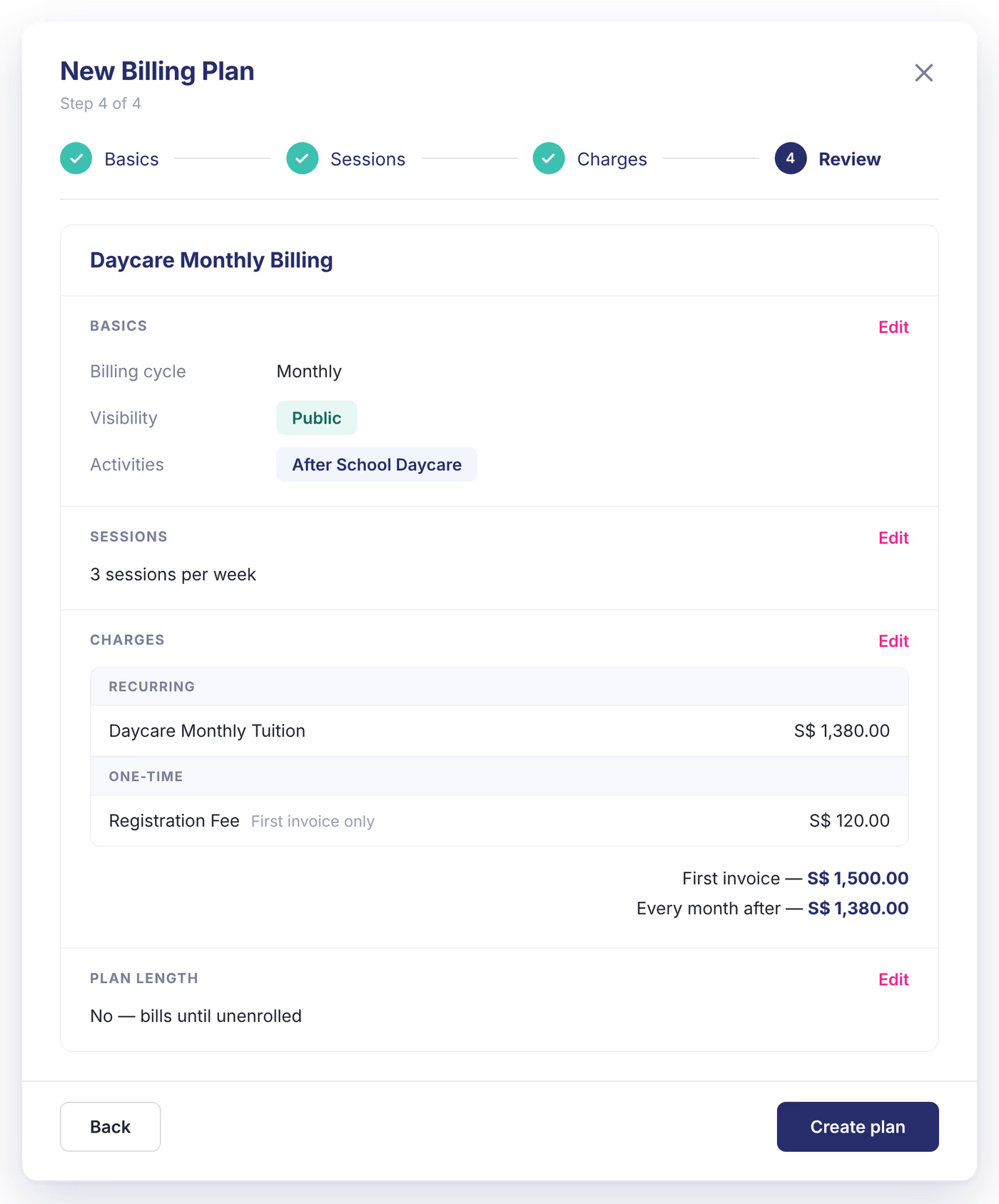
How do you set up a billing plan? Four steps, and you see the bill before you save.
Create a plan in four steps (Basics, Sessions, Charges and Review). Choose a monthly, quarterly, semi-annual or annual cycle, how many sessions the plan includes, and its charges. The preview shows what parents pay on the first invoice and on every invoice after it.
Sessions decided up front
Set a number of sessions per week, a number per billing cycle, or no limit. Student schedules follow that allowance.
Live invoice preview
See the first invoice, including one-time charges such as registration or a uniform, and the recurring amount for every cycle after it.
Internal-only plans
Keep a plan for custom packages, on-break students or an older price for existing families. Parents cannot see or book it, and your admins can still assign it.
Changes reach active students
Edit a plan that students are on and see exactly who is affected. Changes apply from each student's next billing cycle, and invoices already sent stay as they are.
Move a student to another plan
Pick the new plan, the cycle it starts from and the student's new schedule in one flow, capped at the sessions the plan includes.
Change history
Every change to a billing plan or charge records who made it, when, and the value before and after.
How do you get paid? Invoices land, payments just work.
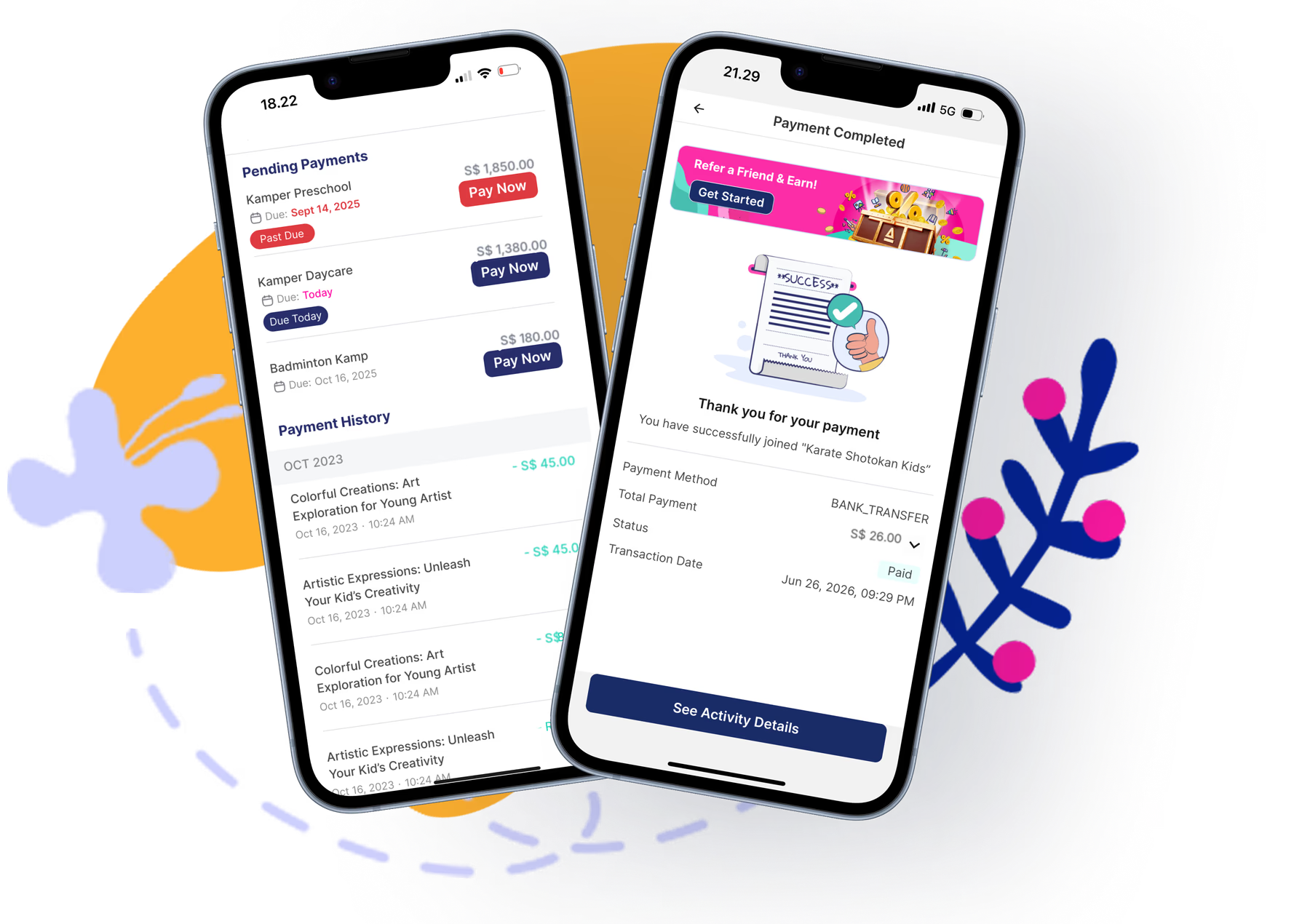
Invoices go out over WhatsApp and email, where parents will actually see them. Parents pay using the methods they already use every day, so there's nothing new to learn and nothing to download just to settle a bill.
Collection, where invoices go, how parents pay
Invoices are delivered over WhatsApp and email. Parents pay in the Happy Kamper app, or directly from the WhatsApp/email link via the Direct Booking site.
Reminders, automated, with a manual nudge when you need one
The system sends parents automated payment reminders on its own schedule. When that's not enough, admins can trigger a manual reminder directly from the Recurring Payments dashboard.
System sends reminders on schedule
One-tap from the dashboard, when needed
Can a family with several children pay one bill? Yes. One invoice, one payment.
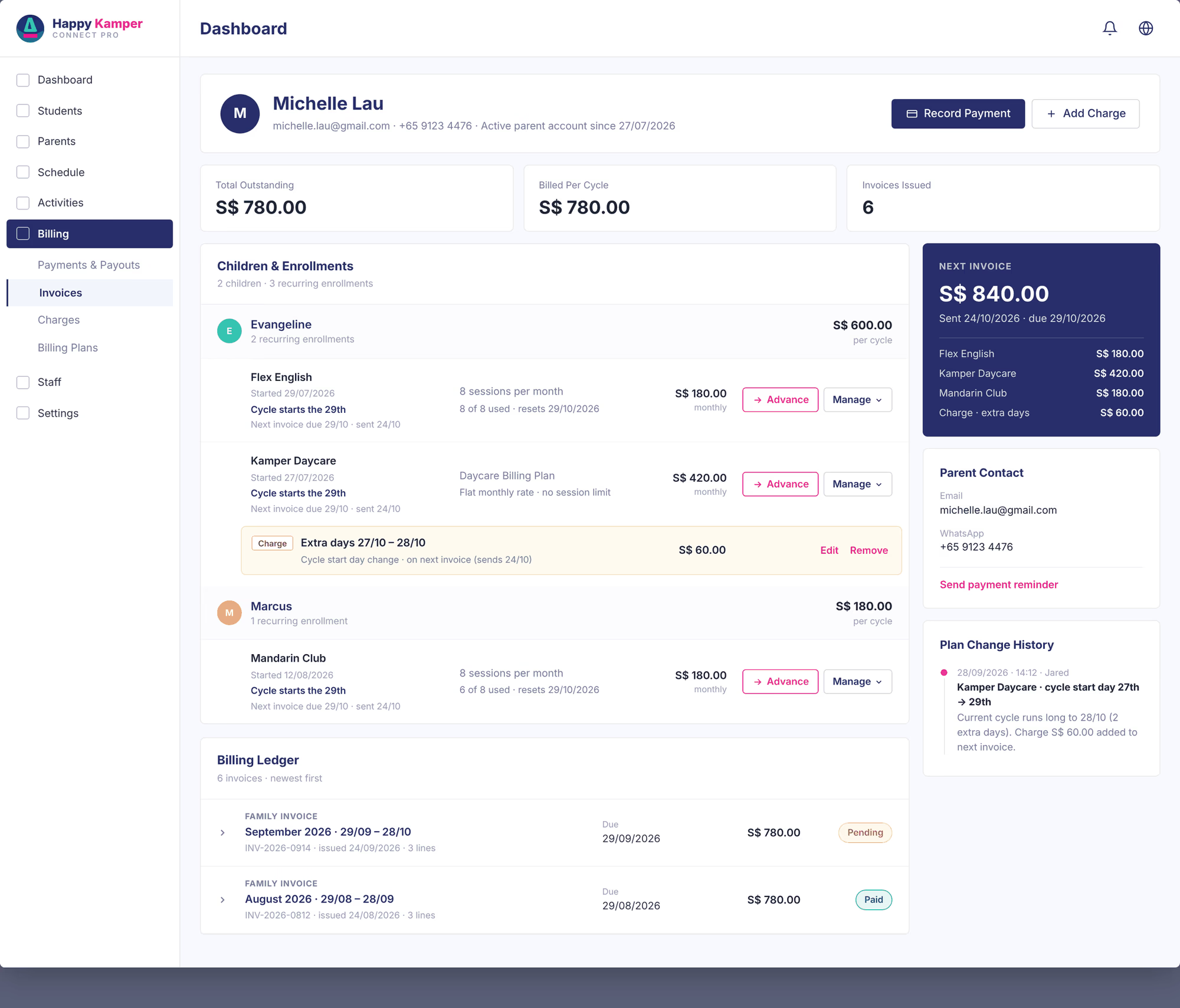
When a family has more than one child or activity with you, Happy Kamper puts all of their recurring charges onto one itemised invoice for each billing cycle. Parents settle it in a single payment in the app, instead of paying for each enrollment separately and carrying a transaction fee on every one.
One itemised invoice
Lines are grouped by child, then by activity, and any added charge sits on its own line. The invoice goes out by email and in the app, opens as a PDF, and is available in English and Bahasa Indonesia.
One payment in the app
Parents pay the whole family bill in one transaction. If a transaction fee applies, it is shown before the parent confirms.
Receipt with check-in codes
After paying, parents see a receipt grouped by child and a check-in QR code for each activity, which they can download and use at the centre.
Due dates that line up
If a family's enrollments bill on different dates, the family page says so and how many invoices that creates. One action aligns them, and the next cycle sends a single invoice.
One page per family
Every child, enrollment, billing plan and session allowance in one place, with Change Plan, Record Payment and Un-enroll right on each row.
A complete family ledger
Every invoice and payment in one list, newest first. Adjusted invoices show the original amount, the new amount, who changed it and when.
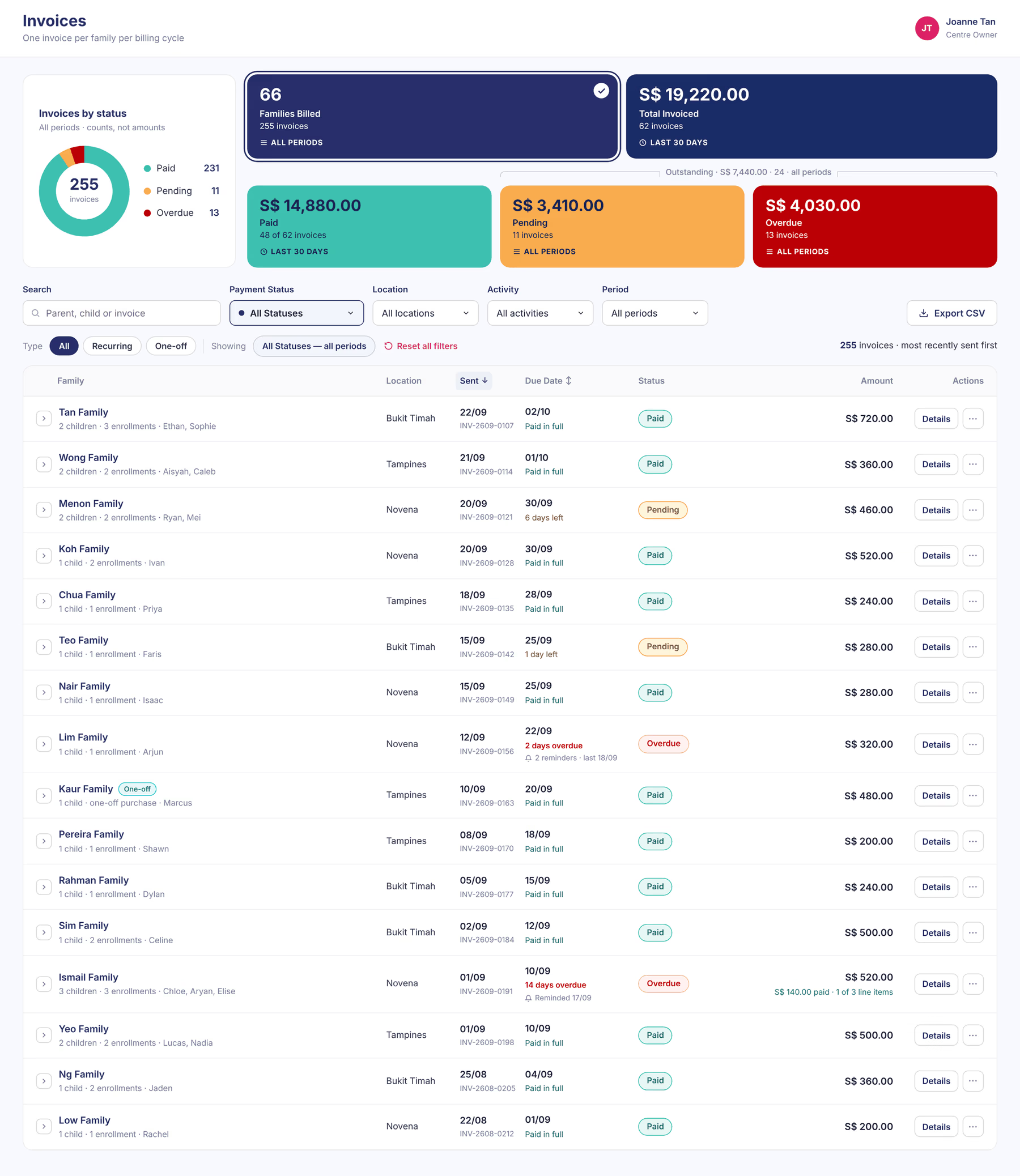
The Recurring Payments dashboard.
Who has paid, who has not, and what the totals are, in seconds, across one centre or seven branches.
| Parent | Child · Activity | Plan | Due | Location | Status | Amount | Last Reminder | Actions |
|---|---|---|---|---|---|---|---|---|
| Sarah T. | Joey · K1 | Monthly · Tuition | 18/05/2026 | Tampines | Paid | S$1,200 | - | |
| Daniel L. | Aira · Music Term | Upfront · Term | 22/05/2026 | Bishan | Pending | S$900 | 2d ago | |
| Priya K. | Rafa · Swim 10-pass | Bundle · Top-up | 03/05/2026 | Jurong East | Past Due | S$450 | 5d ago | |
| Mei Ling C. | Bima · Infant Care | Monthly · Tuition | 15/05/2026 | Punggol | Paid | S$1,600 | - | |
| Ahmad R. | Naila · K2 | Monthly · Tuition | 20/05/2026 | Tampines | Pending | S$1,200 | - |
Each row is one invoice for one family. Expand it to see the lines by child, filter by status, location or activity, and export the filtered list.
Each invoice shows whether email and WhatsApp delivery worked. Correct a wrong contact and resend, from the same screen.
Cash or a manual transfer goes against the right invoice, with the date the money actually arrived. Paying for one child only? Record it against those lines.
Parents receive a receipt for every payment, automatically. A manual payment logged by mistake can be deleted, and the balance updates.
And your money is paid out to your bank account on a regular schedule.
Singapore
Happy Kamper is live in Singapore. Local payment methods include PayNow, e-wallets, and cards. Contact us to get your Singapore centre started.
See how Happy Kamper works for your kind of centre.
Which billing model fits depends on your vertical. Pick the one closest to you.
Ready to automate billing at your centre?
See how Happy Kamper handles invoicing, reminders, and reconciliation for you.
Frequently Asked Questions
Don't see your question?
Payment methods follow each market, and cards (Visa, Mastercard, American Express, and JCB) work everywhere. In Singapore, parents can also pay by PayNow and e-wallets like GrabPay and WeChat Pay. Payment links go out via WhatsApp and email so parents settle invoices from wherever they are.
You set up a billing plan for each programme with its billing cycle (monthly, quarterly, semi-annual or annual), the number of sessions it includes, and its charges. Happy Kamper generates invoices automatically for every enrolled student, sends them to parents through the app, WhatsApp and email, and tracks payment status in real time. You can see who has paid, who has not, and send a reminder to specific parents directly from the dashboard.
Yes. Set up a recurring billing plan once with its charges and billing cycle (monthly, quarterly, semi-annual or annual). Invoices generate and send automatically every cycle without any manual work. Recurring and one-off charges can sit on the same invoice, so a late fee or uniform top-up does not require a separate billing run.
Yes. Happy Kamper puts a family's recurring charges with your centre onto one itemised invoice per billing cycle, grouped by child and activity, and the parent pays it in one transaction in the app. If the family's enrollments bill on different dates, the family page flags it and one action aligns them.
Yes. When a payment covers only part of a family invoice, record it against the line items it pays for. The invoice stays pending until every line is settled, and reminders name what is still outstanding.
Yes. Mark a plan as internal only for custom packages, on-break plans or an older price you keep for existing families. Parents cannot see or book it, and your admins can still assign it to a student.
Billing and payments is included in all paid Happy Kamper plans. Pricing is set per centre and depends on the number of enrolled children and locations. See the pricing page for plan details, or explore the interactive demo to walk through the billing workflow and confirm the right plan before committing.
Yes. Generate revenue reports, outstanding payment summaries, and complete payment history from the Recurring Payments dashboard. Filter by date range, activity, or parent. Export to Excel for your accountant or for internal review. Multi-location operators can roll up reporting across all branches in a single view.
Yes. If a parent pays in cash or by manual bank transfer, record it against the right invoice with the date the money arrived, and it drops off the outstanding list. A payment logged by mistake can be deleted.
Yes. Parents automatically receive a receipt for every payment.
Yes. A one-off charge such as materials, a uniform top-up, or a late fee can sit on the same invoice as a recurring charge.
Yes. Roll up billing across every branch, or filter to one location in a click.