Attendance Tracking & QR Check-In for Activity Centers
Happy Kamper tracks childcare attendance with QR and tap-based check-in. Staff scan a student's QR code or mark them in from the app, and parents and admins see the update on a live roster instantly. It replaces paper sign-in sheets and end-of-month attendance spreadsheets, with Excel export built in.
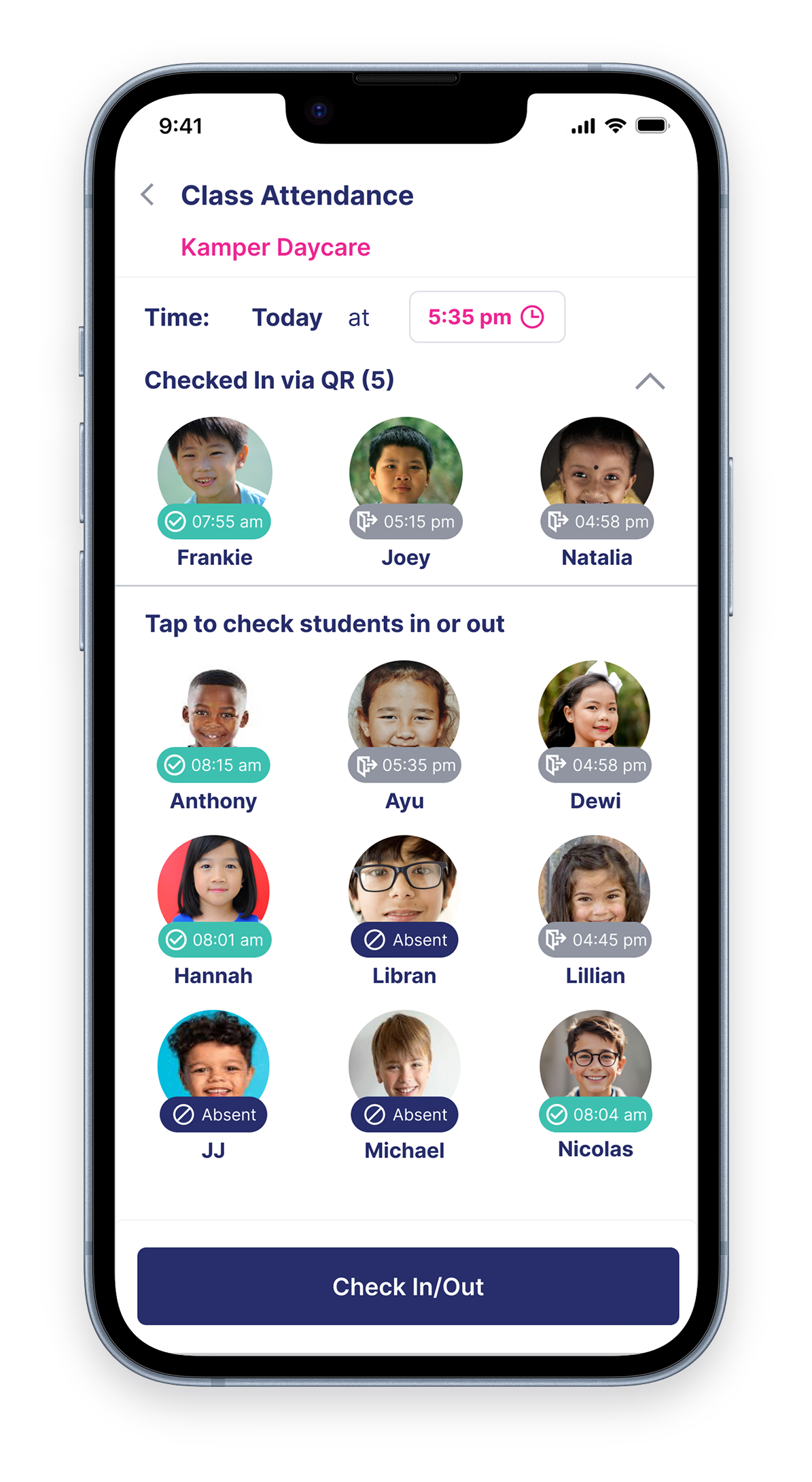
One feature that replaces paper sign-in sheets and end-of-month attendance spreadsheets, for preschools, kindergartens, daycares, tutoring centers, and activity centers. Scan, register, notify, record. In that order, every single day.
How does check-in work, from scan to record?
This is the daily flow at a center using Happy Kamper. Each step is built to take seconds, not minutes, so the line at the door keeps moving and the paper book stays in the drawer.
Staff scans the student's QR code.
Every enrolled student gets a unique QR code in the parent app. The code can be shared by WhatsApp to whoever is doing drop-off or pick-up. Staff scan it from any phone or tablet.
The student is marked present, and the class roster updates live.
The scan matches against the day's roster instantly, student flips from expected to present, with a timestamp and the staff member who scanned. Teachers in the classroom see the change appear on their tablet without refreshing.
Parents get an instant arrived safely notification.
The family on file gets a push notification on the parent app the moment a check-in is recorded. The same happens at check-out, with the exact time logged.
Staff check students out from the app, not the door.
Check-out is an in-app action: a teacher taps the student in the live roster at pick-up and the time of departure is logged automatically. The roster updates instantly across every device in the center.
Every scan stored, with time on site by day, week, and month.
Attendance is stored per student as a student time tracking report. Time on site is aggregated by day, week, and month and exports to Excel for hourly billing.
| STUDENT | PRESENT | HOURS |
|---|---|---|
| Joey Sutanto | 182 abs | 142h |
| Aira Wijaya | 20 | 158h |
| Rafa Hartono | 173 abs | 134h |
What does attendance & check-in actually include?
The capabilities a center director uses to run drop-off, pick-up, and reporting without falling back to paper.
Each student has a stable, unique QR code, scanned by staff at drop-off.
Staff check students out from the live roster at pick-up; departure time is logged automatically.
Mark a student in or out without a scan, or adjust the time in the web portal if a teacher forgets.
Real-time view of who is present, expected, or absent, per class and per center.
A push notification lands on the parent app the moment a check-in or check-out is recorded.
Total time on site per student by day, week and month, exportable to Excel for hourly billing.
Accurate rosters. No manual logs.
Parents already informed before they reach the gate.
That covers attendance and check-in on its own. The rest of Happy Kamper, billing, scheduling, parent communication, and milestones, is built around it.
How does Happy Kamper work for your kind of center?
Attendance is the same everywhere. The rest of the platform, daily reports, milestones, billing rules, schedules, adapts to your vertical. Pick the one closest to you.
Frequently Asked Questions
Don't see your question? Chat on WhatsApp
There is no separate late status. A student stays marked expected until they are checked in, so anyone not yet scanned simply shows as not present.
Yes. Time-on-site totals export to Excel by student, by class, or across the entire center, by day, week, or month, ready for hourly billing.
Only staff check students in. A staff member scans the student's QR code or marks them in from the app or web, and can do so from any phone or tablet.
Yes. Staff can mark a student in or out manually and adjust the time in the web portal.
Staff can use manual entry to mark the student present or absent, with a reason logged to the student time tracking report.
Yes. The staff app, parent app, and admin portal are fully available in Bahasa Indonesia and English.
Yes. For centres in Indonesia, attendance exports are formatted to suit Dinas Pendidikan reporting, with a timestamped record per student by day, week, or month.
Yes. When a staff member marks a student in or out by hand, the entry is logged with its reason to the student time tracking report, so the record shows who was marked present and why.
Ready to digitize attendance at your center?
Replace the paper sign-in sheet this week. Setup takes under a day.