Milestone tracking that fits your framework, and your teachers' day.
Milestone tracking in Happy Kamper lets any center define its own learning framework of domains, subdomains and milestones, then log each child's progress and send organised period reports to parents on a chosen cadence. It works for preschools and daycares, and just as well for dance, music, swim, sports, and tutoring, with whatever framework you already use.
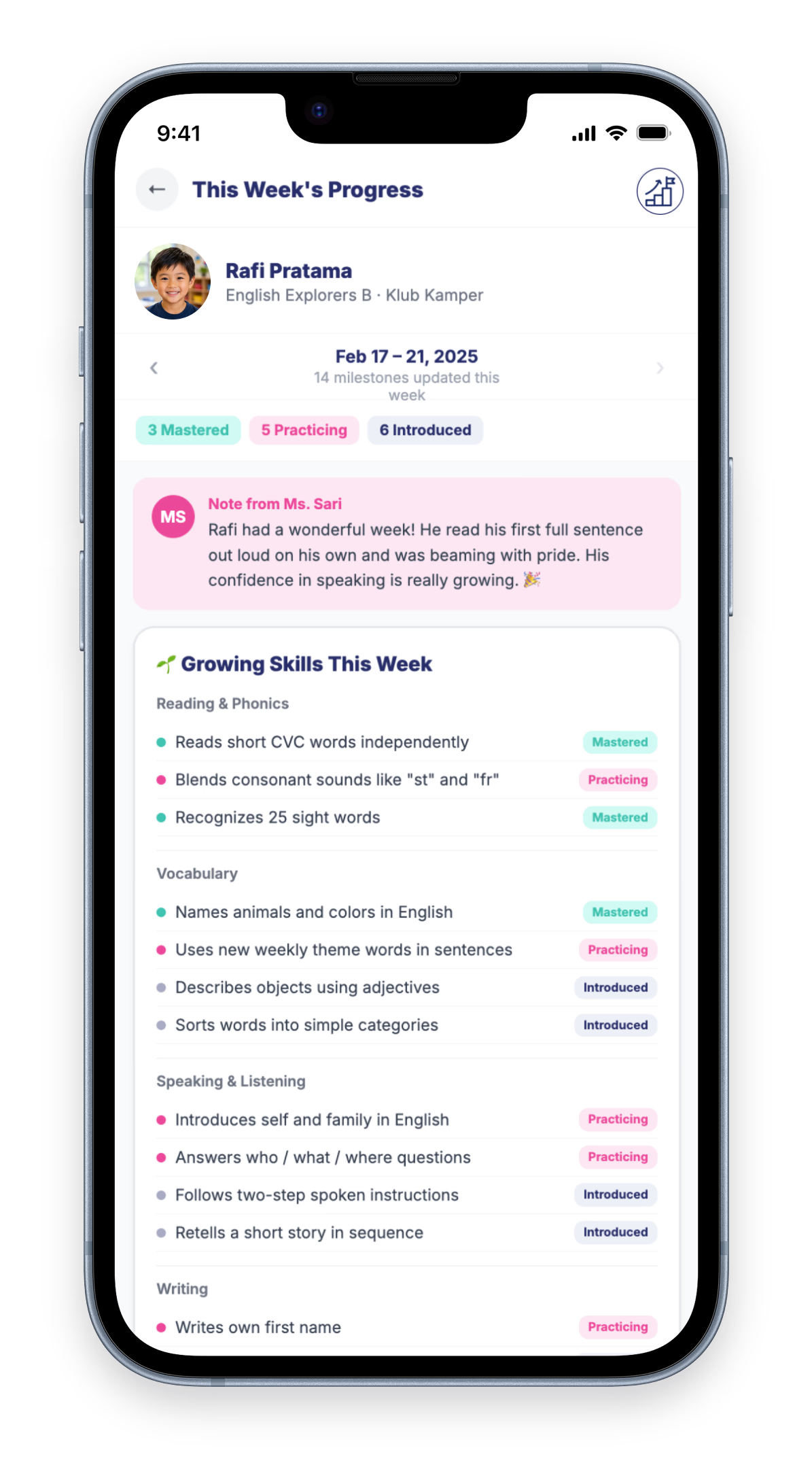
Bring your own learning framework. Log progress three ways without it becoming a paperwork project. Send beautifully organised period reports to parents on your cadence, not a drip-feed of every observation. For any center that tracks how children are growing, whatever framework you already use.
Your framework
1, 2, or 3 tiers, your domains, your milestones.
Three ways to log
Batch a class, deep-dive one child, or log when the app prompts.
Period reports, on your cadence
Weekly to quarterly, never spammed.
Admin dashboard
See at a glance which activities are up to date.
Four beats, from framework to finished report.
The rest of this page is depth on each beat. This is the shape of it.
Set up your framework
Bring what you have, describe what you want, or build from scratch. 1/2/3 tiers, with your rating scale (3, 4 or 5 stages).
Instructors log, three ways
Batch a class on one milestone, deep-dive one child across all of them, or log when the app prompts after an update.
Reports generate on cadence
Weekly, bi-weekly, monthly or quarterly. Collected, never sent one-by-one.
Parents see growth, admins track completion
The period report posts to the parent feed; admins watch the dashboard.
Your framework. Your tiers. Your rating scale.
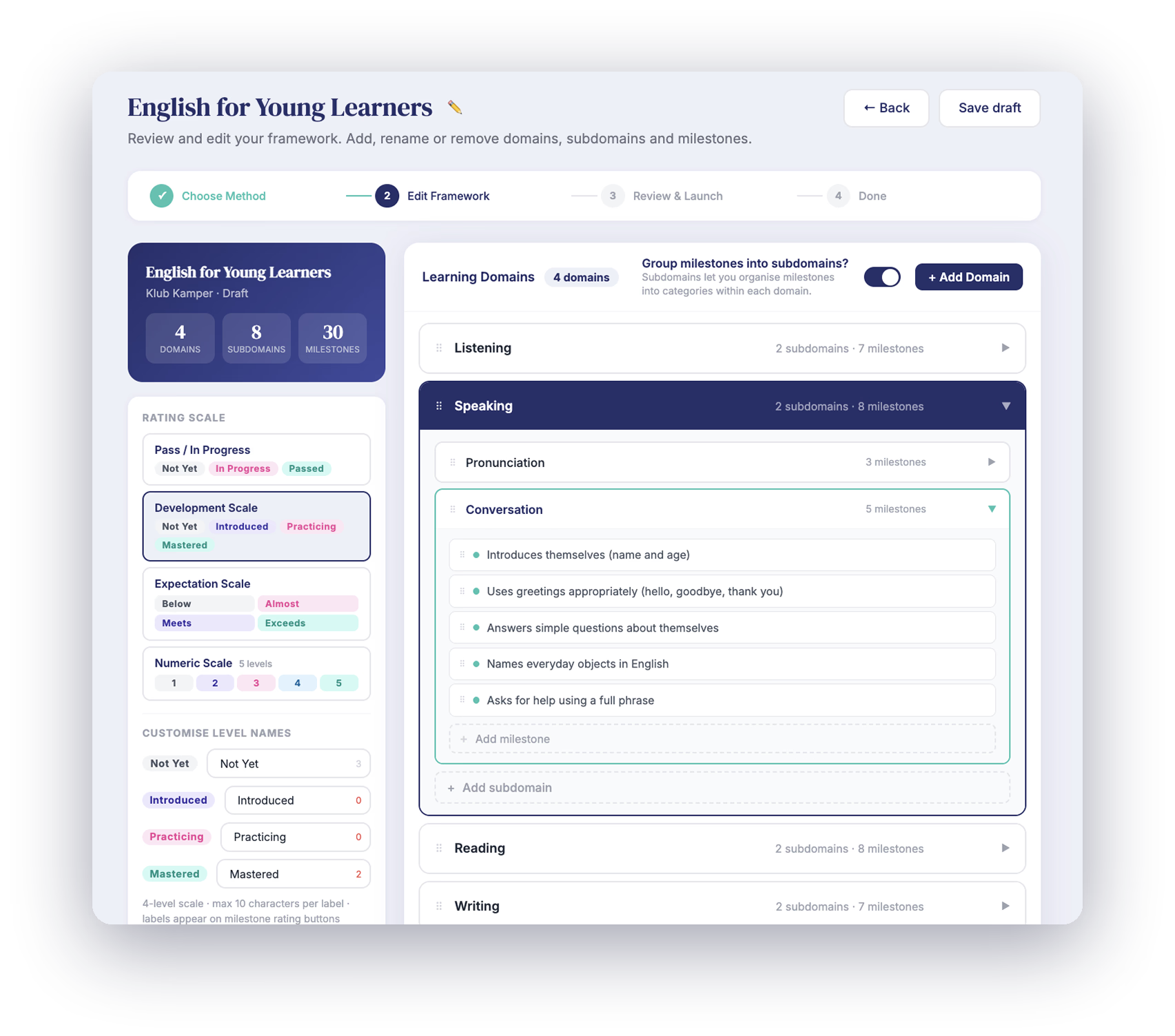
Most milestone tools force your curriculum into their template. Happy Kamper goes the other way: define the framework your center actually uses, and we build the assessment around it.
How many tiers can my framework have?
Up to three, if you want them, and one if you don't. The full model goes Learning Domain, Subdomain, Milestone: a fit for Montessori-style centers. Two tiers work well for dance and music. One tier is fine too. Pick the depth your framework actually needs.
Just milestones
A flat list. Good for short programs and single-skill activities.
Domain → Milestone
A clean grouping. Good for dance, music, and most preschools.
Domain → Subdomain → Milestone
The full model. Good for Montessori-style centers and detailed early-years frameworks.
How do I get my framework into Happy Kamper?
There are three ways, and you don't need a documented curriculum to start. Pick the path that matches where you are: upload what you have, describe what you want, or build it yourself. AI handles the heavy lifting on the first two; the third is full manual control.
Bring what you have
Upload your existing framework (a curriculum PDF, a spreadsheet, even an old report template) and our AI converts it into a Happy Kamper framework.
Upload & convertDescribe what you want
No existing framework? Tell us what your program is and what you want children to learn, and our AI generates a complete starting framework for you.
Describe & generateBuild it yourself
Prefer to do every milestone by hand? Open the framework builder and lay out your tiers, domains and milestones from scratch. No AI involved.
Build manuallyCan the rating scale match how my center talks about progress?
Yes. Choose 3, 4 or 5 stages and rename every stage to match how your center talks about progress. Pick one of the four standard scales below, or build your own from scratch. The rating scale is part of the framework, configured once.
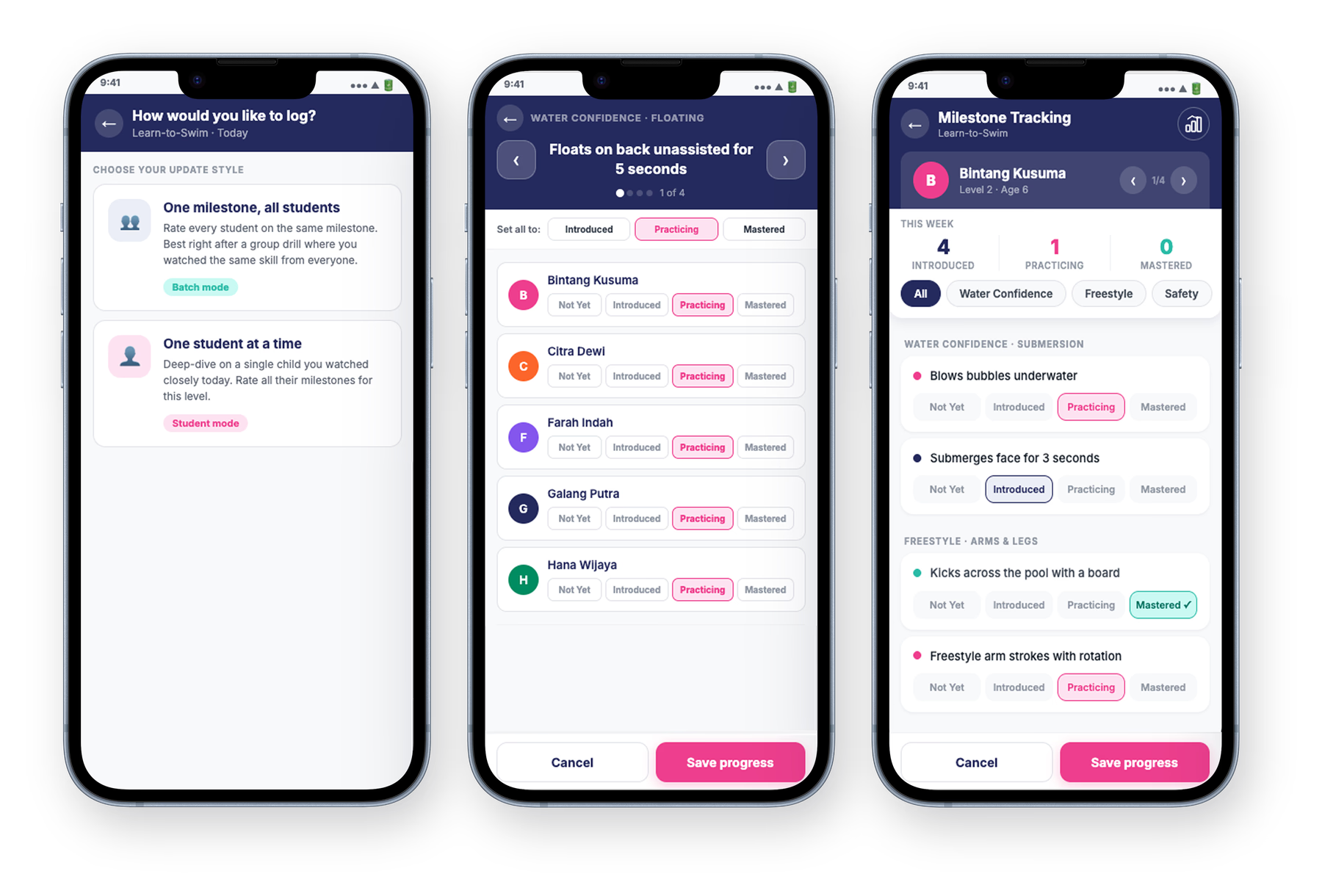
Three ways to log. Two you choose, one the app prompts.
Two of these are the teacher's call: pick Batch or Student depending on what you just observed. The third happens automatically the moment a teacher posts an update, so milestone logging doesn't fall off the end of the day.
How do I log one milestone for the whole class?
Use Batch mode. Best after a group activity: everyone tried the same thing, you saw the whole class.
- Pick a domain, then a subdomain, then the milestone.
- One 'Set all' tap applies one rating to everyone. Adjust individuals from there.
How do I log all the milestones for one student?
Use Student mode. Best after a close individual observation: you focused on one child and want to capture it across domains.
- Open the child, walk through the framework one milestone at a time.
- Same rating scale.
- Useful for new joiners, after a parent meeting, or for a focused observation day.
When does the app prompt the teacher to log?
Right after they observed it. App-initiated, triggered right after an instructor posts an update about a child (or several).
- Tap it and you land in Batch mode, already filtered to the children that update went to, on the milestone you just saw.
- The app controls the when; the teacher decides the what. Every rating is the teacher's call.
- Takes milestone logging off the end of a tired teacher's day.
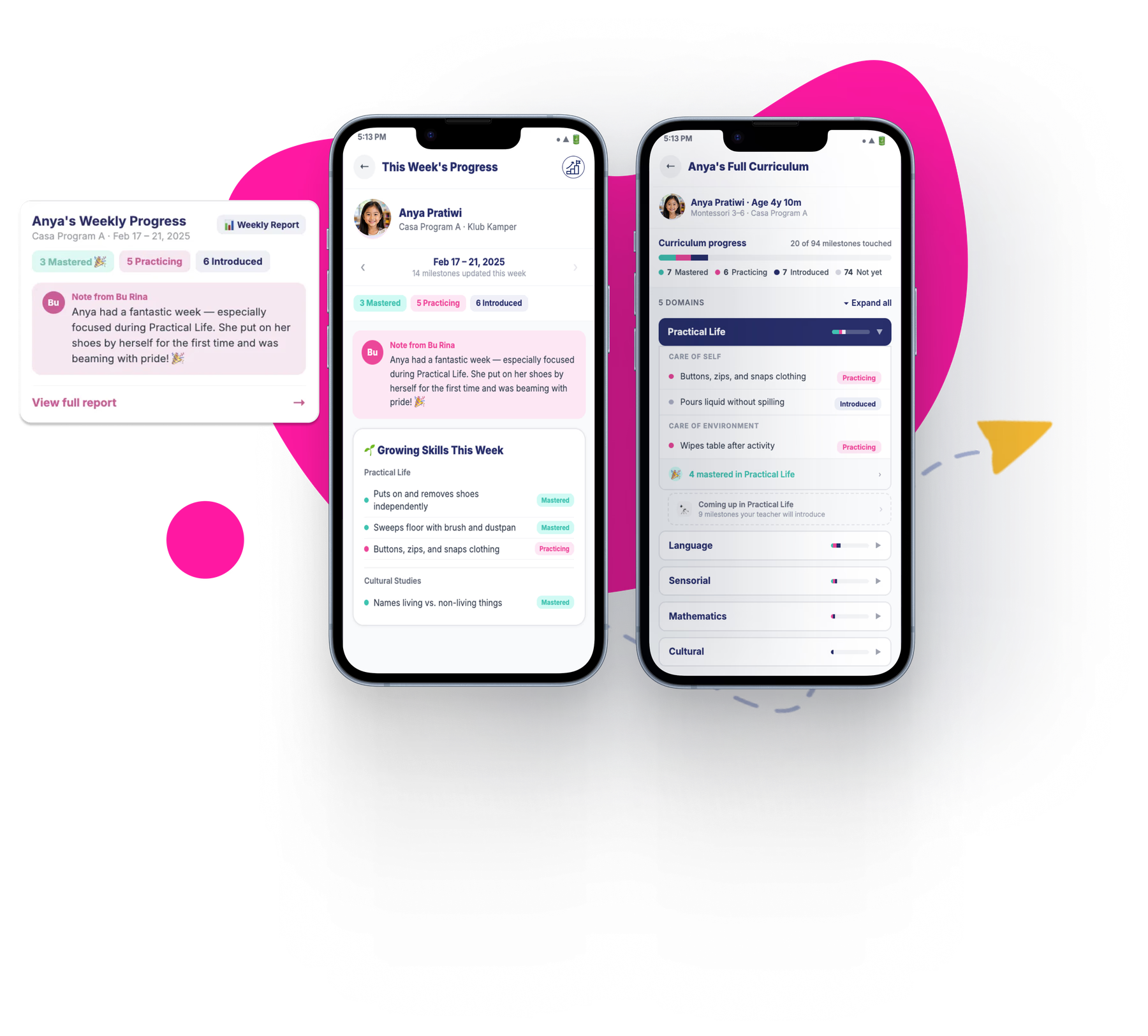
One report, not a hundred pings.
Most parent-comms tools push every observation the moment it's logged. We don't. We deliberately collect milestone updates and send them as a single, organised period report.
Parents stop reading by Wednesday.
One thoughtful arrival. Parents actually read it.
How often do parents get reports?
As often as you pick, once, per framework. Most preschools and Montessori centers land on weekly because they see the kids often enough that frequent updates fit. Enrichment centers and 1-to-1 programs that meet less frequently often pick monthly or quarterly. Set it during framework setup; instructors stop thinking about it.
What lands in the parent feed?
The period report posts as a single update inside the parent app. Inside it, parents see three things.
This period's progress
Every milestone updated during the reporting window, each with its rating and the teacher's optional note.
Overall progress since enrolment
The full picture of where your child started, where they are now, and how far they've come in this activity.
What's coming up next
The milestones the framework lines up for the period ahead, so parents can support at home, if they want to.
The Milestone Progress dashboard.
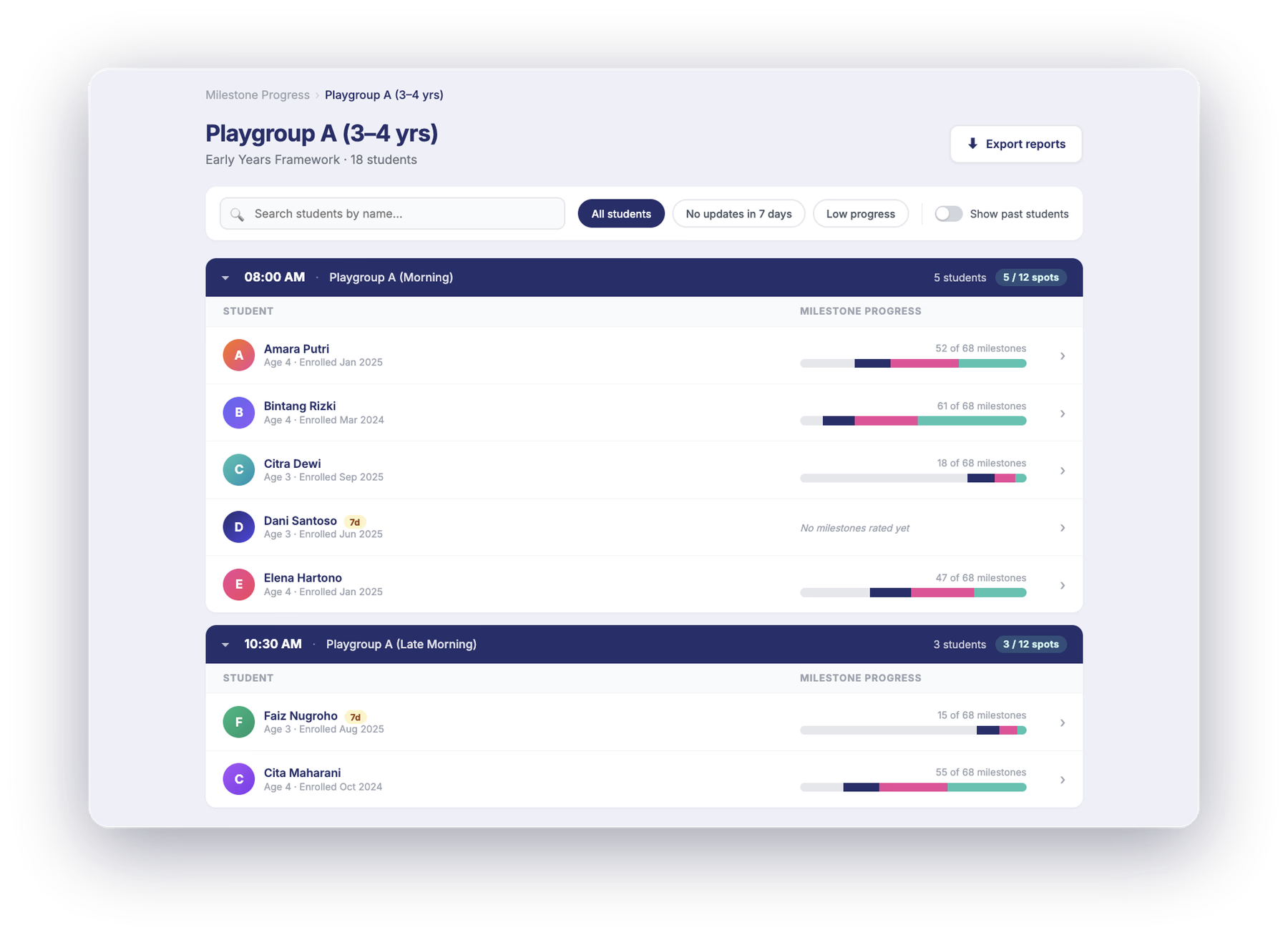
A center-wide view of how teachers are logging progress across every activity. Built so a director can spot a class that's drifted in 30 seconds, not 30 minutes.
What does per-activity status show?
Every activity in the center shows a status (Up to date or Overdue), plus the percentage of students assessed, how many updates were logged (e.g. in the last 30 days), and the age of the last assessment.
How does the dashboard remind teachers?
Gently. When an activity hasn't been assessed in a while, the dashboard flags it with a soft prompt ("teachers may need a reminder") instead of buzzing your teachers with notifications.
Per-student rollups
Every enrolled student shows their progress as a simple count (e.g. 67 of 94 milestones assessed). Past students, including those who have left, stay visible for records.
Cumulative PDF export · one ZIP, one PDF per student
An admin can export student reports in one go: the system generates a cumulative PDF per student (every milestone progress entry, every status change, every teacher note to date) and bundles them into a single ZIP. Useful for end-of-year archives, handing records to a school the family is moving to, or sharing a final report at graduation.
See how Happy Kamper works for your kind of centre.
Milestone tracking is the signature feature for preschools, kindergartens and daycares, but the framework system flexes for music, sports and tutoring programs too. Pick the one closest to you.
Frequently Asked Questions
Don't see your question? Chat on WhatsApp
A feature that lets you define your own learning framework (domains, subdomains, and milestones), then log each child's progress and send organised period reports to parents. Works with whatever framework your center already uses.
Yes. Upload your existing curriculum document (a PDF, a spreadsheet) and the AI converts it into a Happy Kamper framework. You can also describe what you want and have it generated, or build it manually from scratch.
Batch mode: choose one milestone, rate the whole class at once. Best after a group activity. Student mode: open one child and log all their milestones in one session. Best after an individual observation.
You decide: weekly, bi-weekly, monthly, or quarterly. The cadence is set once during framework setup and applies to all reports afterward. Parents receive one organised period report, not a notification for every observation.
Yes. Each period report includes this period's progress, overall progress since enrolment, and the milestones lined up for the period ahead.
The app is available in English and Bahasa Indonesia.
Yes. The Milestone Progress dashboard shows every activity in the centre with its completion status, percentage of students assessed, last update date, and a flag for activities that have not been updated recently.
Yes. Admins can export a cumulative PDF per student: every milestone progress entry, status change, and teacher note to date, bundled into a single ZIP file. Useful for end-of-year archives or transferring records to a new school.
Milestone tracking is part of Connect Pro, not Connect Lite. Pricing is tailored to your market and the size of your center, so explore the interactive demo and book a setup call for a quote.
Yes. The staff app and parent app are available on iOS and Android. Admins and owners can also access the full dashboard via web browser on any device.
Ready to bring your framework into Happy Kamper?
Define your own milestones. Log progress three ways. Send organised period reports to parents on your cadence, not a drip-feed of every observation.