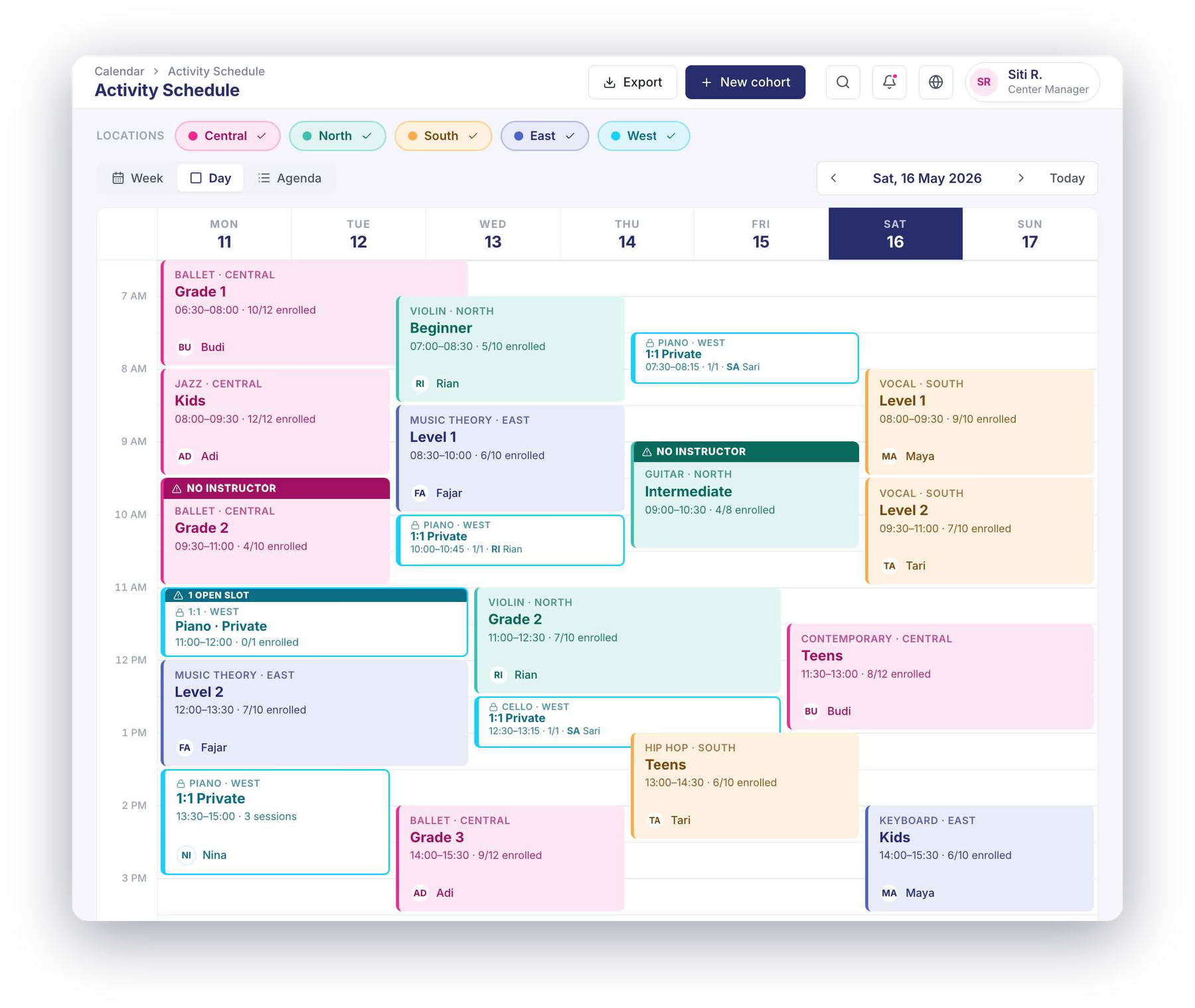
Class scheduling and enrollment for children's activity centres.

Happy Kamper schedules and enrolls children at activity centres with two schedule types: Flex, where parents pick from the time slots you open, and Fixed, where parents enroll into groups on a set timetable. Parents book and reschedule from the app, and the system blocks any booking past class capacity.

Every center runs its timetable differently, and most software forces one rigid model on you. Happy Kamper gives you two schedule types, plus groups that can flex by day and location, so scheduling and enrollment bend to how your center actually works.

Flex schedules: full flexibility for parents to pick their time.
Fixed schedules: the same group and teacher every week.
Configure total sessions per week, or per month.
Self-service rescheduling that respects your rules and capacity.
Built for single sessions, ongoing and term programs, drop-ins and multi-day camps
Activity schedule and enrollment view

How do schedules handle real complexity?

Two schedule types, three program shapes, groups that can shift across days and locations. The structure bends to your center, not the other way around.

An activity in Happy Kamper

Each activity carries a capacity, schedule(s), an age range, and an assigned instructor. The shape of the activity itself flexes too:

Single sessions Class bundles Fixed-term classes Multi-day classes (e.g. a one-week camp)
Schedule type 1 · Flex

How does Flex scheduling work?

Parents pick the time, from the times you've opened. Best for 1-to-1 lessons, trial sessions, drop-ins: anything where the parent should choose when to come in.

Provider availability · BSDSet by you
TueWedThuFriSat09:0014:0016:00
Parent picked · Wed 14:00
  • You set the available days of the week and start times.
  • Availability can be customized per location: one branch can open different times to another.
  • Works for one session a week or several.
  • Parents pick the slot that suits them, from what you've opened.
Schedule type 2 · Fixed

How does Fixed scheduling work?

You run groups on a set rhythm across days and locations. Best for any program where you want to keep the same children together and keep continuity with the instructor: the schedule is yours, parents enroll into it.

Junior Swim2 groups
Group A3×/week
Tue16:00 Bintaro
Thu17:00 BSD
Sat09:00 Bintaro
Group B3×/week
Mon15:00 BSD
Wed15:00 BSD
Fri16:30 Bintaro
  • Multiple schedules per activity (Group A on Tue/Thu/Sat, Group B on Mon/Wed/Fri).
  • Each group can run at different times on different days: a Thursday evening group, a Saturday morning group.
  • Location can also flex within a single schedule: Tuesday at Bintaro, Thursday at BSD.

How do session allowances work?

How many sessions a child gets, and what counts as “a period”: that depends on the center. Happy Kamper supports the two models real centers actually configure.

Model 1 · Per billing cycle

A constant number per cycle.

A fixed allowance the parent gets each billing cycle (e.g. 8 sessions per month).

8 sessions / monthCycle: May 2026
3 scheduled4 available1 used
Model 2 · Per week

For continuity when cycles are uneven.

A constant number every week (e.g. 2 sessions per week), regardless of cycle length.

2 sessions / weekThis week · Wk 21
Wk 18
Wk 19
Wk 20
Wk 21
1 scheduled1 availablethis week

Why two models, not one.

There aren't always the same number of Saturdays in a month, and rolling enrollments mid-cycle mean billing periods don't always line up evenly. Per-week allowances give parents the same number of sessions every week regardless of whether their cycle has four Saturdays or five. Per-cycle is cleaner when the program is tied to the billing month. Centers pick the one that matches how they actually run.

Balance is visible on both sides.

Parents see the count in the Happy Kamper app; admins see it in the web portal: the same scheduled / available / used numbers, on the same activity, in real time.

Overbooking is prevented at the source.

The system does not allow scheduling more sessions than the available allowance. It's a hard stop, not a warning that fires after the fact.

Unused sessions expire at end of cycle.

Whatever the parent didn't use in this cycle expires, and is replaced by the next cycle's allowance: clean reset, every cycle.

Which channels can children enroll through?

Center-side registration. Self-registration in the parent app. Public bookings flowing in. Three intake channels, one enrollment record.

1Provider-led

You register the child from the portal.

Open Child Details, register the child into the activity, set the schedule and start date. Done.

As part of the same step, you can send the first invoice or log a manual payment.

2Parent self-register

Parents register inside the Happy Kamper app.

Parents already in your center can pick an activity and enroll a child themselves, without anyone at the front desk.

3Direct booking

Public bookings flow into the same system.

New families discovering you via Direct Booking land in the same enrollment record: just another intake channel, no separate inbox.

Instant or with confirmation.

Enrollment can be instant (the child is in the moment they register) or it can require a provider confirmation step before being confirmed. Your call, per activity.

Instantor Require confirmation

Multi-child in one go.

A parent with siblings can enroll multiple children at the same time: one flow, one confirmation, separate enrollment records per child.

A AiraB BimaN Naila

Recurring enrollment.

Activities set up as recurring keep renewing each billing cycle until the child is unenrolled, so term roll-overs happen automatically.

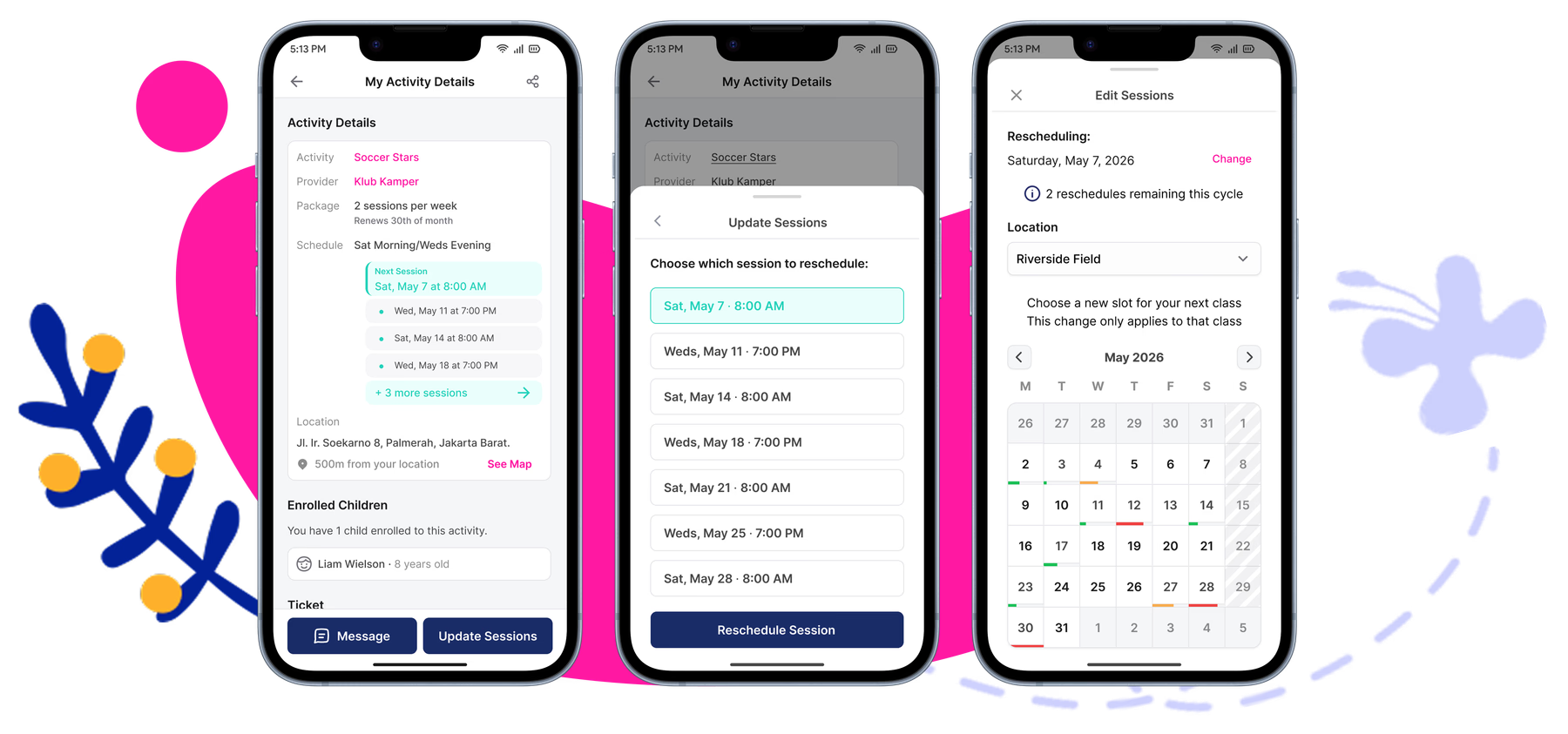
How does rescheduling respect the rules and the credits?

Half the value of class scheduling software is what happens when parents can't make it. The mechanics are actually thought through.

Set up once · Per activity

You decide what rescheduling looks like.

For each activity, providers can turn rescheduling on, set how much notice parents need to give, and cap how many reschedules are allowed per billing cycle.

Allow rescheduling
Required lead time24 hours
Max reschedules / cycle3
Day-to-day

Parent-initiated. Provider-overridable.

  • Parents reschedule from the app themselves

    No call to the center, no DM. They move the session inside the Happy Kamper app.

  • Providers can also reschedule on a parent's behalf

    From the web portal (useful when a parent calls, or when the center needs to move a session).

  • Rescheduling respects class capacity limits

    The destination class has to actually have room: no double-booking past capacity, ever.

Credit-aware logic

The reschedule path depends on what credit the child has left.

This is where the allowance model from earlier becomes concrete. Two paths, picked automatically:

Has available credits?YES

Schedule a standalone session.

The child uses one of their available allowance credits and goes on a new session on a different day. Balance ticks down by one.

All allowances used?YES

Pick an existing class slot to swap into.

No new credit is spent: the child moves into another class slot that already exists, subject to that class's capacity.

Reschedule flow

Who sees the schedule, and where?

Instructors get the day on their phone. Admins get the full picture per child in the web portal.

Parent

In the Happy Kamper parent app.

  • The child's upcoming sessions: what's on this week, in order.
  • The allowance balance: scheduled / available / used.
  • Reschedule a session themselves, within the rules you set.
Joey · Junior SwimThis week
Tue 21 May · 16:00 Reschedule
Thu 23 May · 17:00 Reschedule
Allowance3 sched · 4 avail · 1 used
Instructor

In the Happy Kamper instructor app.

  • Activity schedule: the day's classes, in order.
  • Activity Roster per class: the actual children who should be there.
Today · Tue 14 MayBintaro
15:00
Junior Swim · Group A 8 / 10
16:30
Junior Swim · Group B 6 / 10
18:00
Senior Swim · Group C 9 / 12
Admin

In the web portal · Child Details · Schedule tab.

  • The child's recurring pattern: the standing schedule.
  • Upcoming sessions: add, edit, or delete per-session.
  • The allowance count: scheduled / available / used.
  • Completed sessions for the history log.
ScheduleAttendanceBillingMilestones
Recurring
Tue 16:00 · Bintaro
Thu 17:00 · BSD
Upcoming
Tue 21 May · 16:00

Frequently Asked Questions

Don't see your question?

Flex scheduling lets parents choose from your open time slots: you set the available days and start times, parents pick what works for them. Fixed scheduling runs groups on a set timetable: you define the schedule, parents enroll into it. Both types are available across different activities as needed.

Yes. A Fixed group can be configured with a different location per session day: Group A can run Tuesday at Bintaro and Thursday at BSD within the same schedule. This is built directly into the schedule setup.

Use per-cycle when your billing periods are consistent and the program maps cleanly to the billing month. Use per-week when your cycles have an uneven number of class days: for example, months with five Saturdays versus four. Per-week gives parents the same number of sessions every week regardless of cycle length.

Yes. With Flex scheduling, parents can book one session a week or several, from the times you've opened.

No. Unused sessions expire at the end of the billing cycle and are replaced by the next cycle's allowance. This keeps the balance clean and predictable for both the center and the parent.

Parents can reschedule directly from the Happy Kamper app, within the notice period and reschedule limit you set per activity. Admins can also reschedule on behalf of a parent from the web portal, which is useful when a parent calls in.

When all allowances are used, the reschedule flow switches automatically. Instead of booking a new session, the child moves into an existing class slot at a different time, subject to that class's capacity. No new credit is consumed.

The system blocks any booking past class capacity, so a full class can't be overbooked. Rescheduling respects the same limit.

Both options are available and set per activity. Enrollment can be instant confirmation (the child is registered the moment the parent completes the flow) or it can require a provider review step before the enrollment is confirmed. You decide per activity.

Yes. A parent with multiple children can enroll all of them in a single flow. Each child receives a separate enrollment record, but the parent only needs to complete one confirmation step.

Yes. When you enroll a child you can send their first invoice as part of the same step. The billing detail lives on the Billing & Payments page.

Ready to bring real scheduling to your centre?

See how Happy Kamper handles Flex, Fixed, groups, and session allowances built around how your centre actually runs.

See Pricing